PvP
БИНДЫ В РАСТ BINDINGS IN RUST

Руководство по введению Биндов в игру и понятию из предназначению A guide to introducing Binds into the game and understanding their purpose
Создание Биндов
Открываем консоль [кнопка F1] и водим туда необходимый вам бинд из перечисленных ниже в данном руководстве. 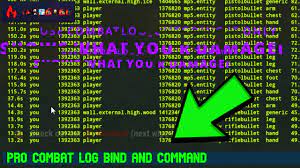
Creating Binds
Open the console [F1 button] and enter the required bind from those listed below in this guide.
Удаление Биндов
Удаление Биндов
Для удаления бинда открываем консоль [кнопка F1] и водим одну из трёх предложенных команд:
Например чтобы снять бинд с клавиши f:
bind f f
bind f clear
unbind f
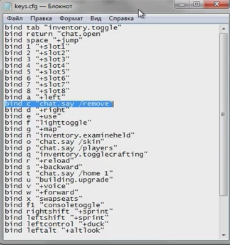
Для удаления бинда открываем консоль [кнопка F1] и водим одну из трёх предложенных команд:
Например чтобы снять бинд с клавиши f:
bind f f
bind f clear
unbind f
Deleting Binds
To remove the bind, open the console [F1 button] and enter one of the three suggested commands:
For example, to unbind the f key:
bind f f
bind f clear
unbind f
For example, to unbind the f key:
bind f f
bind f clear
unbind f
Список Биндов
bind 0 "audio.game 0.2" , чтобы вернуть bind 9 "audio.game 1" - удобно регулировать громкость, когда управляешь шумным транспортом, чтобы слышать тиммейта.
bind mouse1 +hoverloot;+attack2 - автолутание правой кнопкой мышки.
bind j +attack - Автоатаку.
bind u +attack;+duck - Автоатака в писеде.
bind z +forward;+sprint - Автобег.
bind q +jump;+sprint;+duck - прыжок в неудобные места, например в окно.
bind k kill - Самоубийство.
bind 2 +slot2;+attack - Использовать предмет в 2 слоте (удобно использовать для быстрого применения шприца и бинта) .
bind p +attack;+jump - Удары в прыжке (удобно для рейда кирками потолков).
bind o disconnect - Бинд на дисконект/отключение с сервера.
bind F1 consoletoggle;combatlog - Открывается combatlog при нажатии на F1. (позволяет быстро проверить в консоле сколько хп осталось у противника)
bind i reload;attack;duck - Бинд для рейда пайпами. Этот бинд будет автоматически делать выстрелы, а после этого перезаряжать оружие.
bind mouse1 +hoverloot;+attack2 - автолутание правой кнопкой мышки.
bind j +attack - Автоатаку.
bind u +attack;+duck - Автоатака в писеде.
bind z +forward;+sprint - Автобег.
bind q +jump;+sprint;+duck - прыжок в неудобные места, например в окно.
bind k kill - Самоубийство.
bind 2 +slot2;+attack - Использовать предмет в 2 слоте (удобно использовать для быстрого применения шприца и бинта) .
bind p +attack;+jump - Удары в прыжке (удобно для рейда кирками потолков).
bind o disconnect - Бинд на дисконект/отключение с сервера.
bind F1 consoletoggle;combatlog - Открывается combatlog при нажатии на F1. (позволяет быстро проверить в консоле сколько хп осталось у противника)
bind i reload;attack;duck - Бинд для рейда пайпами. Этот бинд будет автоматически делать выстрелы, а после этого перезаряжать оружие.
List of Binds
bind 0 "audio.game 0.2" to return bind 9 "audio.game 1" - it is convenient to adjust the volume when driving a noisy vehicle in order to hear your teammate.
bind mouse1 +hoverloot;+attack2 - auto-loot with the right mouse button.
bind j +attack - Auto attack.
bind u +attack;+duck - Auto-attack in the ♥♥♥♥♥.
bind z +forward;+sprint - Autorun.
bind q +jump;+sprint;+duck - jump into inconvenient places, such as a window.
bind k kill - Suicide.
bind 2 +slot2;+attack - Use an item in slot 2 (convenient to use for quickly using a syringe and bandage).
bind p +attack;+jump - Jumping attacks (convenient for raiding ceilings with pickaxes).
bind o disconnect - Bind to disconnect/disconnect from the server.
bind F1 consoletoggle;combatlog - Opens combatlog when pressing F1. (allows you to quickly check in the console how much HP the enemy has left)
bind i reload;attack;duck - Bind for raiding with pipes. This bind will automatically fire shots and then reload the weapon
bind mouse1 +hoverloot;+attack2 - auto-loot with the right mouse button.
bind j +attack - Auto attack.
bind u +attack;+duck - Auto-attack in the ♥♥♥♥♥.
bind z +forward;+sprint - Autorun.
bind q +jump;+sprint;+duck - jump into inconvenient places, such as a window.
bind k kill - Suicide.
bind 2 +slot2;+attack - Use an item in slot 2 (convenient to use for quickly using a syringe and bandage).
bind p +attack;+jump - Jumping attacks (convenient for raiding ceilings with pickaxes).
bind o disconnect - Bind to disconnect/disconnect from the server.
bind F1 consoletoggle;combatlog - Opens combatlog when pressing F1. (allows you to quickly check in the console how much HP the enemy has left)
bind i reload;attack;duck - Bind for raiding with pipes. This bind will automatically fire shots and then reload the weapon
Бинды для модифицированных серверов
bind g chat.say "/home 1" - бинд на тп домой с заданным именем 1.
bind y chat.say /tpa - бинд на принятие тп.
bind u building.upgrade - улучшение построек.
bind x chat.say /remove - режим удаления построек.
bind k chat.say /kit - получить кит.
bind t chat.say "/tpr ник игрока" - отправка телепорта к игроку.
bind q chat.say "/trade yes" - принять трейд.
bind o backpack.open - открыть рюкзак.
Если команды с chat.say / не работают, то напишите команды без chat.say /
И еще на модовых серверах можно ставить и создавать свои бинды. Например: команда (bind) задает букву, а, команда (chat.say) пишет в чат. Поэтому можно создать свой бинд, к примеру, (bind ins chat.say /outpost). Для раздельных команд, таких как (/home 1)-(/trade yes) нужны кавычки, либо у вас просто будет писать (/home) или (/trade) в чат, без лишних букв !
bind y chat.say /tpa - бинд на принятие тп.
bind u building.upgrade - улучшение построек.
bind x chat.say /remove - режим удаления построек.
bind k chat.say /kit - получить кит.
bind t chat.say "/tpr ник игрока" - отправка телепорта к игроку.
bind q chat.say "/trade yes" - принять трейд.
bind o backpack.open - открыть рюкзак.
Если команды с chat.say / не работают, то напишите команды без chat.say /
И еще на модовых серверах можно ставить и создавать свои бинды. Например: команда (bind) задает букву, а, команда (chat.say) пишет в чат. Поэтому можно создать свой бинд, к примеру, (bind ins chat.say /outpost). Для раздельных команд, таких как (/home 1)-(/trade yes) нужны кавычки, либо у вас просто будет писать (/home) или (/trade) в чат, без лишних букв !
Binds for modified servers
bind g chat.say "/home 1" - bind to TP home with the given name 1.
bind y chat.say /tpa - bind to accept tp.
bind u building.upgrade - improving buildings.
bind x chat.say /remove - mode for removing buildings.
bind k chat.say /kit - get a kit.
bind t chat.say "/tpr player nickname" - sends a teleport to the player.
bind q chat.say "/trade yes" - accept trade.
bind o backpack.open - open the backpack.
If commands with chat.say / do not work, then write commands without chat.say /
You can also install and create your own binds on the mod servers. For example: the command (bind) sets the letter, and the command (chat.say) writes to the chat. Therefore, you can create your own bind, for example (bind ins chat.say /outpost). For separate commands such as (/home 1)-(/trade yes), quotation marks are needed, or you will simply write (/home) or (/trade) in the chat, without extra letters!
bind y chat.say /tpa - bind to accept tp.
bind u building.upgrade - improving buildings.
bind x chat.say /remove - mode for removing buildings.
bind k chat.say /kit - get a kit.
bind t chat.say "/tpr player nickname" - sends a teleport to the player.
bind q chat.say "/trade yes" - accept trade.
bind o backpack.open - open the backpack.
If commands with chat.say / do not work, then write commands without chat.say /
You can also install and create your own binds on the mod servers. For example: the command (bind) sets the letter, and the command (chat.say) writes to the chat. Therefore, you can create your own bind, for example (bind ins chat.say /outpost). For separate commands such as (/home 1)-(/trade yes), quotation marks are needed, or you will simply write (/home) or (/trade) in the chat, without extra letters!
Бинды для крафта
bind b "Craft.add 1840822026 10"
bind c "Craft.add 1079279582 10"
bind i "Craft.add -742865266 10"
bind l "Craft.add -1878475007 10"
bind y "Craft.add -265876753 999"
bind n "Craft.add -592016202 100"
С-Шприц +
В-Бобовки +
I-рокеты +
y-Порох +
L-сочели +
n-експа +
bind c "Craft.add 1079279582 10"
bind i "Craft.add -742865266 10"
bind l "Craft.add -1878475007 10"
bind y "Craft.add -265876753 999"
bind n "Craft.add -592016202 100"
С-Шприц +
В-Бобовки +
I-рокеты +
y-Порох +
L-сочели +
n-експа +
Binds for crafting
bind b "Craft.add 1840822026 10"
bind c "Craft.add 1079279582 10"
bind i "Craft.add -742865266 10"
bind l "Craft.add -1878475007 10"
bind y "Craft.add -265876753 999"
bind n "Craft.add -592016202 100"
S-Sprits +
V-Bobovki +
I-rocket +
y-Gunpowder +
L-socheli +
n-expa +
bind c "Craft.add 1079279582 10"
bind i "Craft.add -742865266 10"
bind l "Craft.add -1878475007 10"
bind y "Craft.add -265876753 999"
bind n "Craft.add -592016202 100"
S-Sprits +
V-Bobovki +
I-rocket +
y-Gunpowder +
L-socheli +
n-expa +
Конец
Теперь вы знаете много о биндах и их применение,спасибо всем что прочитали мое руководство,удачи в игре!
End
Now you know a lot about binds and their use, thanks to everyone for reading my guide, good luck in the game!

Комментарии 0
Войди через Discord, чтобы комментировать